
Update Old Reference
Update your old reference number to the new format — no CNIC or personal info required.
Enter your 14-digit reference number (no dashes or spaces).
Why Update Your HAZECO Reference Number?
On January 6, 2023, Hazara Electric Supply Company (HAZECO) officially separated from PESCO. As part of this transition, your old PESCO reference number was updated, specifically the middle 5-digit Sub Division (SDIV) code, which now reflects the new HAZECO system.
Example:
- Old PESCO Reference: 08-26735-0121483
- New HAZECO Reference: 08-27224-0121483
Why Do You Need to Update Ref Number?
Without updating your reference number, you will not be able to check your bill online. The new 14-digit HAZECO reference number is required to access your bills and make payments using HAZECO’s online services.
By using this Reference Number Converter, you can quickly update your old PESCO number to the new HAZECO number and continue using HAZECO Quick Bill, Web Bill, and Duplicate Bill services without interruption.
How to Convert Your Old PESCO Reference Number
- Find Your Old Reference Number: Locate your 14-digit PESCO reference number on your previous bills.
- Enter Your Old Number: Use the field below to input your old 14-digit PESCO reference number.
- Get the New Reference Number: Once submitted, the tool will instantly convert your old number to the updated 14-digit HAZECO reference number.
- Use the Updated Reference Number: Use this new reference number for viewing bills, downloading duplicates, and making payments.
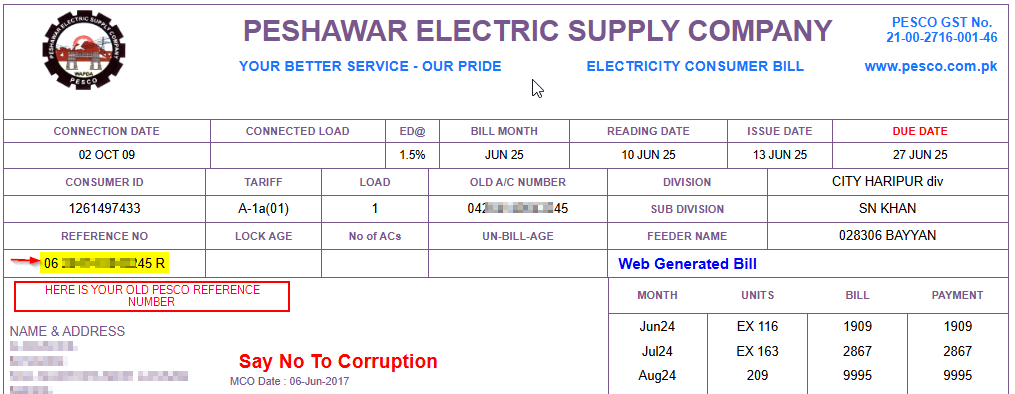
No personal details or CNIC are required for this process. This service is completely free and secure.
Bill Checker
Once your new HAZECO reference number is updated, you can use it directly with the Bill Checker tool to:
- View your current bill online
- Download duplicate bills
- Access Quick Bill services