
5 Ways to Register HAZECO Complaint Online and Through 118 Helpline
Electricity is the lifeline of modern living, but even the best systems face issues. Whether you are a resident of Abbottabad, Haripur, Mansehra, or the remote valleys of Kohistan, dealing with power outages or inflated bills can be stressful.
Since its separation from PESCO in 2023, the Hazara Electric Supply Company (HAZECO) has been working to streamline its services. However, technical faults, meter reading errors, and line losses still occur. The good news? You no longer need to stand in long queues outside the SDO office to get heard.
This comprehensive guide will walk you through every method available to lodge a complaint with HAZECO, track its status, and ensure your issue is resolved.
HAZECO Complaint Prerequisites
To register a complaint successfully, you must have the following details ready. This ensures the system (or the operator) can locate your connection immediately:
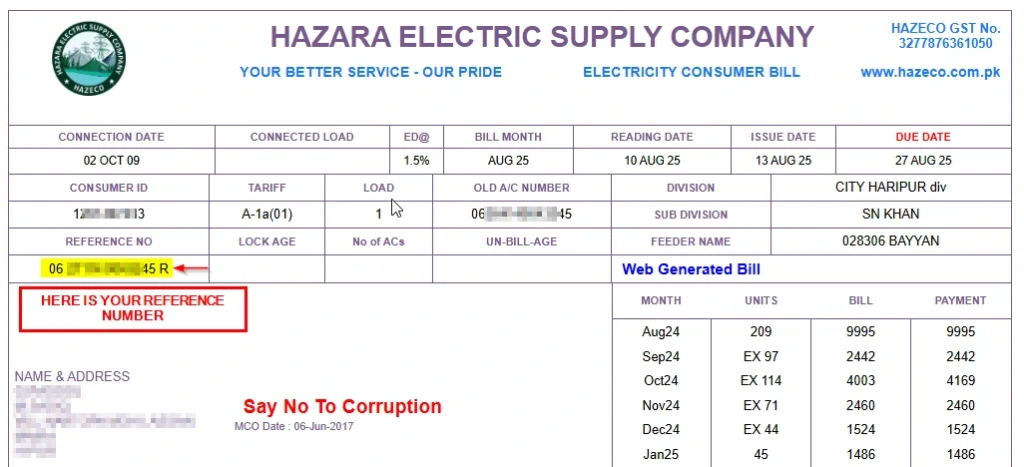
- 14-Digit Reference Number: This is the most critical piece of data. It is printed on the top left of your electricity bill.
- Consumer Name: As it appears on the bill.
- Mobile Number: To receive SMS updates regarding your complaint’s status.
- Nature of Issue: Be specific (e.g., “Voltage fluctuation,”, “Meter Burnt”, “Wrong Reading”, “Transformer Sparking” etc.).
- Nearest Place Name
Online HAZECO Complaint Registration (CCMS)
The most effective way to log a complaint is through the Customer Complaint Management System (CCMS). This central database is monitored by the PITC (Power Information Technology Company) and ensures your complaint isn’t ignored.
Step-by-Step Guide to Using CCMS:
Step 1: Access the Portal Open your web browser and visit https://ccms.pitc.com.pk/complaint or click here
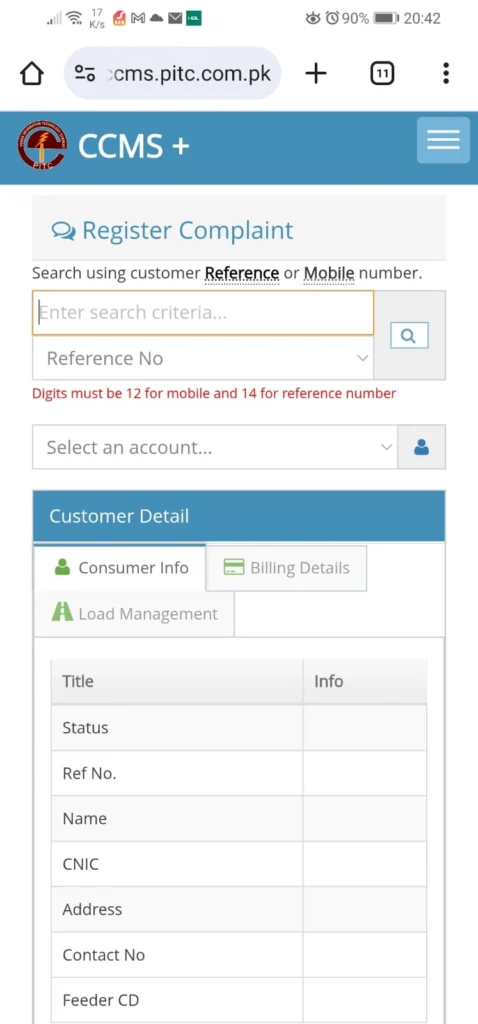
Step 2: Search for Your Connection Details On the search bar, you now have three convenient options to find your account:
- By Reference Number: Enter your 14-digit reference number (without spaces) for a direct lookup.
- By Registered Mobile Number: Ideal if you have forgotten your reference number.
- By CNIC: Useful if you have multiple connections registered under one name.
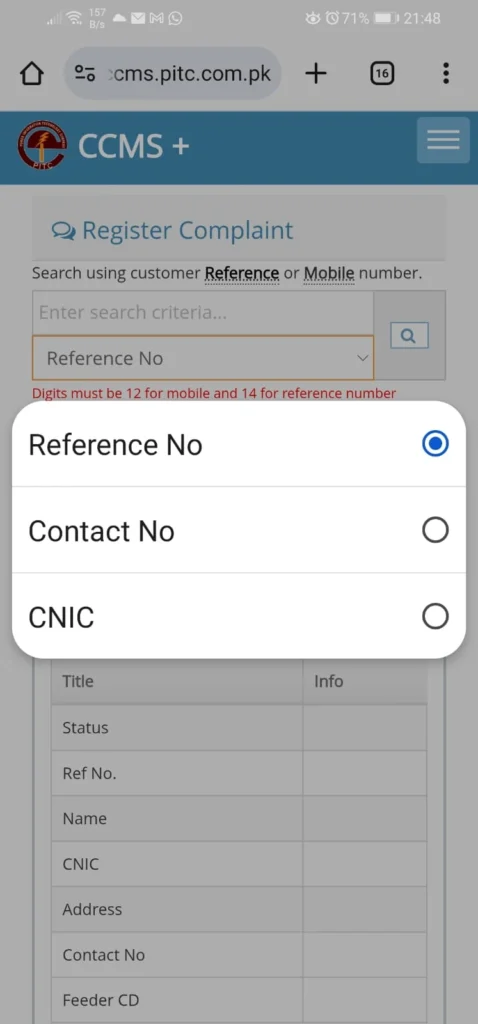
Note: If you search by Mobile Number or CNIC, the system will display a list of all linked connections below. Simply select the relevant connection from the list to proceed.
Step 3: Fill in the Complaint Form Details Once your connection details are loaded, you need to provide the specific details of your issue. The system uses a two-step classification to ensure your complaint reaches the right department.
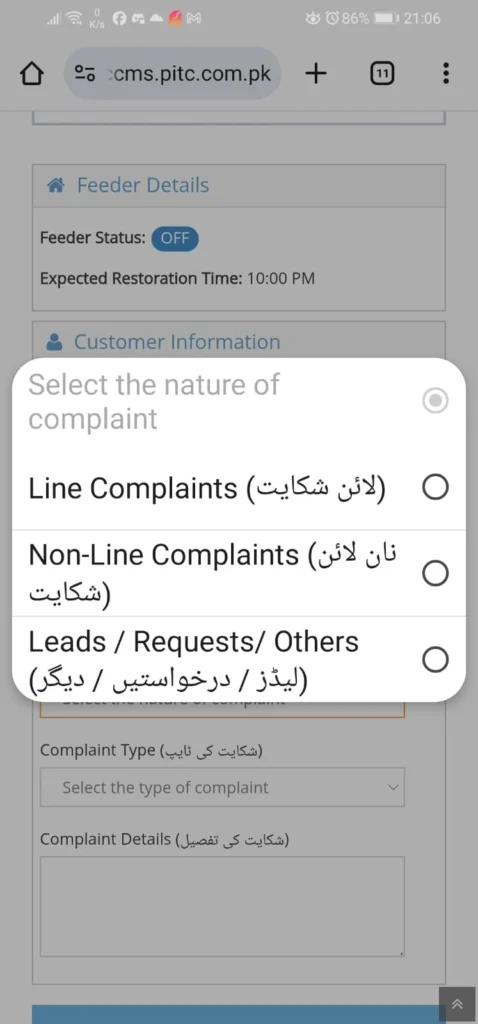
- Select Complaint Category (شکایت کی کیٹیگیری): You will see a dropdown with three main options. Choose the one that fits your situation:
- Line Complaints (لائن شکایت): Select this for technical faults, low voltages, power outages, sparking, or transformer issues.
- Non-Line Complaints (نان لائن شکایت): Select this for billing errors, meter reading issues, theft reporting, or corruption complaints.
- Leads / Requests / Others (لیڈز / درخواستیں / دیگر): Select this for new service requests, such as changing your meter location, applying for net metering, or name changes.
- Select Complaint Type (شکایت کی ٹایپ): Based on the category you chose, a second list will appear. This is very detailed. For example, if you have a voltage issue, you can select “Low/High Voltage.” If you need a temporary connection for a wedding or construction, you would select “Temporary Connection (عارضی کنکشن).”
- Complaint Details (شکایت کی تفصیل): In the text box, briefly explain the issue.
- Tip: If you selected “Billing,” mention the specific month and reading. If “Line Fault,” mention the location of the pole or wire.
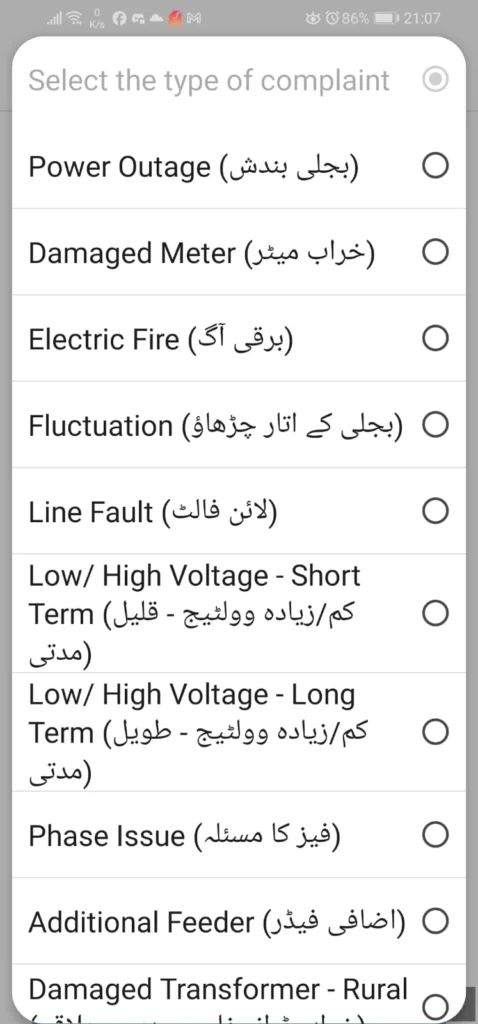
Step 4: Submit and Track Click “Register Complaint.” You will see a Complaint Number / Ticket ID on the screen. Write this down. You will use this number to track the progress of your application on the same website.
HAZECO Complaint via ‘Roshan Pakistan’ Mobile App
For smartphone users, the Roshan Pakistan app (formerly DISCO Light) puts the complaint center in your pocket.
- Download the app from the Google Play Store or Apple App Store.
- Register using your Reference Number.
- Tap on “Lodge Complaint.”
- The app automatically uses your GPS location (optional) and account details to file the report.
- You can also view your load-shedding schedule and billing history here.
HAZECO Complaint via SMS Service (8118)
If you don’t have internet access, the 8118 SMS service is a quick alternative.
How to send the SMS: Type a message in the following format and send it to 8118: [Reference Number] [Space] [Complaint Details] [Space] [Your Name]
Example: 12345678901234 Transformer Fuse Blown Abbottabad Umar Khan
You will receive an automated reply with your ticket number.
HAZECO Complaint via 24/7 Helpline (118 Call)
For emergencies, such as a fallen wire, a fire hazard, or a total area blackout, speaking to a human is often best.
- Dial 118 from any landline or mobile network.
- No balance? Don’t worry, with any active call package, you can still make the call.
- This connects you to the central DISCO Call Center.
- The operator will ask for your Reference Number and lodge the complaint manually.
HAZECO Complaint via Direct Regional Support
HAZECO operates through specific administrative “Circles.” If online methods fail or your issue requires urgent intervention from a senior officer (like an SDO or XEN), contacting the correct office is crucial.
HAZECO is divided into two main circles:
- Hazara-1 Circle: Covers Abbottabad and Haripur districts.
- Hazara-2 Circle: Covers Mansehra, Battagram, and Kohistan districts.
Finding the specific phone number for your local Sub-Division Officer (SDO) or Executive Engineer (XEN) can be difficult. To make this easier, we have compiled a complete, up-to-date phone directory for all circles.
Click here to view the HAZECO Circles Officers Contact Directory.
Note: This directory includes direct numbers for Revenue Officers (for billing issues) and Technical Officers (for line faults) across all Hazara sub-divisions.
While we recommend using the CCMS portal for a computerized record, visiting your local subdivision office is the final resort if your issue remains unresolved for weeks.
Escalating the HAZECO Complaint – NEPRA & Federal Ombudsman
If HAZECO fails to resolve your legitimate complaint within a reasonable timeframe (usually 14 days for billing or technical issues), you have two higher legal avenues to approach.
1. NEPRA (Regulatory Authority)
Your first step outside of the company should be the National Electric Power Regulatory Authority (NEPRA). They have a specific Consumer Affairs Division (CAD) to handle complaints against DISCOs.
- How to file: You can use the “NEPRA Asaan Lodgement” system online.
- Requirement: You must provide proof (your CCMS Tracking Number) that you attempted to resolve the issue with HAZECO first and they failed to act.
2. Federal Ombudsman (Wafaqi Mohtasib)
If you are not satisfied with NEPRA’s response, or if the issue involves severe maladministration (bad service, rudeness, unjustified delays, or unfair billing), you can approach the Federal Ombudsman (Wafaqi Mohtasib).
- Why choose this? It is a free service (no lawyer required) and they are legally bound to decide cases within 60 days.
- How to file:
- Visit the official website: www.mohtasib.gov.pk.
- File a complaint online or send a written application via post (free of cost) to the Islamabad Secretariat or any Regional Office (Abbottabad/Peshawar).
- Crucial Note: You must file this complaint within 3 months of the issue arising. Like NEPRA, they will ask for proof that you first complained to HAZECO (CCMS Ticket ID).
Which Category Should I Choose when Filling the HAZECO Complaint Form?
Confused about the options? Here is a breakdown of common issues and which Complaint Category they fall under on the CCMS portal.
1. When to choose “Line Complaints (لائن شکایت)”
Choose this category for any physical issue with the electricity supply grid, wires, or transformers.
- Power Outage (بجلی بندش): If your power is out while neighbors have electricity.
- Line Fault (لائن فالٹ): Broken wires, sparking on poles, or loose connections.
- Voltage Issues:
- Low/High Voltage – Short Term (کم/زیادہ وولٹیج – قلیل مدتی)
- Fluctuation (بجلی کے اتار چڑھاؤ)
- Transformer Issues:
- Damaged Transformer (خراب ٹرانسفارمر)
- Transformer Oil Leakage (ٹرانسفارمر کے تیل کا رساؤ)
- Tripping due to Transformer (ٹرانسفارمر کی وجہ سے ٹریپنگ)
- Safety Hazards:
- Live Fallen Wire (گرے ہوئے برقی تار)
- Electric Fire (برقی آگ)
- Electrical Safety (برقی حفاظت)
2. When to choose “Non-Line Complaints (نان لائن شکایت)”
Choose this for administrative issues, billing disputes, and reporting illegal activities.
- Billing Issues:
- Excess Billing (زیادہ بلنگ) / Under Billing (کم بلنگ)
- Detection Bill (ڈیٹیکشن بل)
- Late/Non-Delivery of Bill (بل کی دیر سے یا عدم ترسیل)
- Meter Reading Issues:
- Wrong Meter Reading (غلط میٹر ریڈنگ)
- No Meter Reading Taken (میٹر ریڈنگ نہیں لی گئی)
- Defective Meter (خراب میٹر)
- Theft & Corruption:
- Electricity Theft (بجلی چوری)
- Bribery/Corruption (رشوت/بدعنوانی)
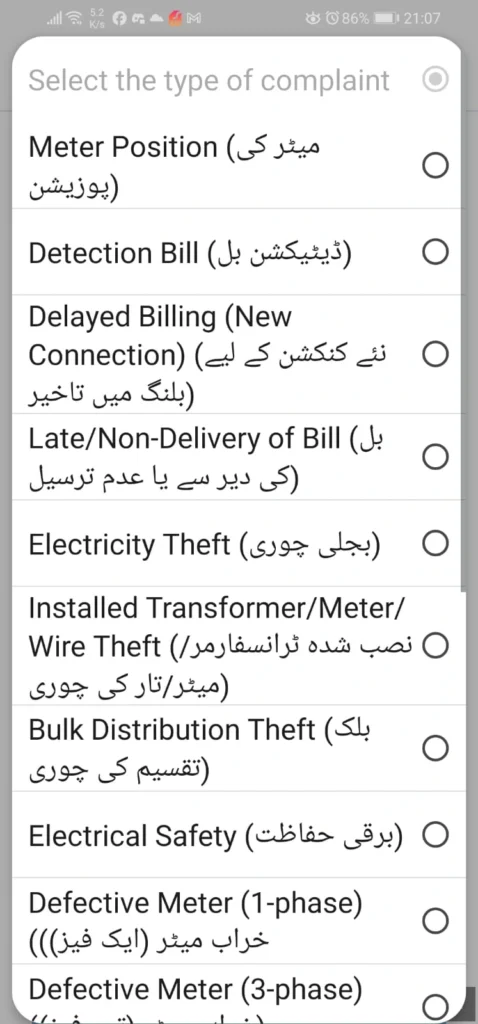
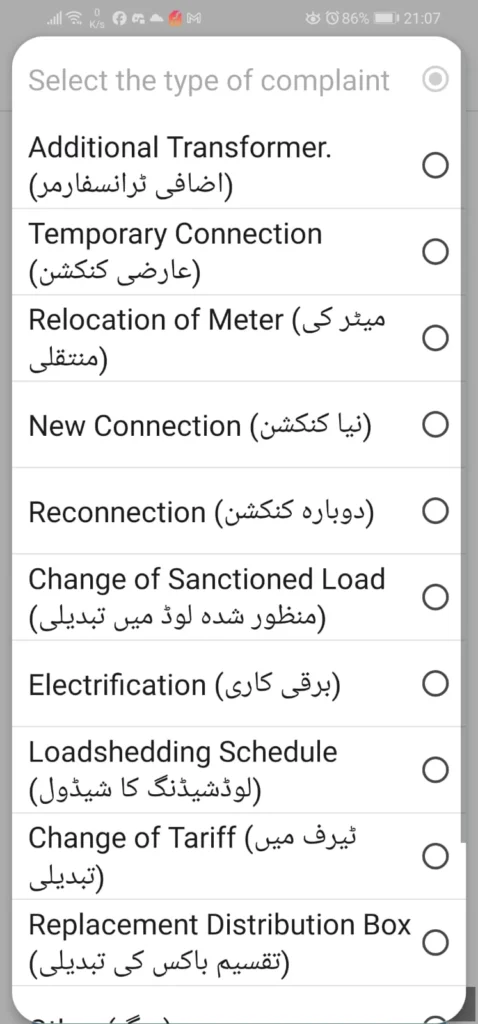
3. When to choose “Leads / Requests / Others (لیڈز / درخواستیں / دیگر)”
Choose this category if you are requesting a service rather than reporting a fault.
- Connection Requests:
- New Connection (نیا کنکشن)
- Temporary Connection (عارضی کنکشن)
- Reconnection (دوبارہ کنکشن)
- Modifications:
- Change of Name (نام کی تبدیلی)
- Change of Tariff (ٹیرف میں تبدیلی)
- Change of Sanctioned Load (منظور شدہ لوڈ میں تبدیلی)
- Relocation of Meter (میٹر کی منتقلی)
- Solar/Green Energy:
- Net Metering (نیٹ میٹرنگ)
Frequently Asked Questions (FAQs)
Q1: How long does it take for HAZECO to resolve a complaint?
A: Minor technical faults (like a fuse blown) are typically resolved within 4-12 hours. Billing corrections may take 7-14 days as they require verification by the Revenue Officer (RO).
Q2: Is the 118 helpline free?
A: Yes, dialing 118 is toll-free from landlines. Standard call charges may apply depending on your mobile network package.
Q3: Can I register a complaint about electricity theft?
A: Absolutely. You can report theft anonymously via the CCMS portal by selecting “Theft Reporting” or by calling 118. This helps reduce line losses and improves voltage in your area.
Q4: My bill shows “Detection Bill.” What should I do?
A: A detection bill is added if HAZECO suspects meter tampering or a slow meter. If you believe this is an error, file a “Billing Complaint” on CCMS immediately and attach a photo of your meter to prove it is functioning correctly.
Q5: What if the tracking status shows “Resolved” but my power is still out?
A: This sometimes happens due to system auto-updates. You should immediately call 118, quote your old ticket number, and state that the issue persists. You can also re-open the complaint on the Roshan Pakistan App.
Q6: Can I apply for a New Connection via the complaint portal?
A: No, the complaint portal is for issues with existing connections. For new connections, you must use the ENC (Electricity New Connection) website. Here is a complete guide on how to apply for a new electric connection through ENC.
Q7: How do I attach a picture of my wrong bill online?
A: When using the CCMS web portal, look for the “Attachments” section at the bottom of the form. You can upload a clear image (JPG/PNG) of your bill or meter reading.
Q8: I lost my Reference Number. How can I find it?
A: You can find it on any old bill. If you don’t have a physical bill, go to our home page and search by your name or CNIC (if previously registered) or check your SMS history if you are subscribed to bill alerts.
Q9: Does HAZECO have an email address for complaints?
A: While specific email addresses for XENs exist, they change frequently. The most reliable digital method remains the CCMS portal, as it generates a legally trackable ticket number.
Q10: Can I complain if the voltage is too low?
A: Yes, low voltage damages appliances and is a valid technical complaint. Select “Voltage Fluctuation” in the complaint category.
Q11: Can I go to court against HAZECO?
A: Yes, but the Civil Courts process is lengthy and expensive. It is highly recommended to use the Federal Ombudsman (Wafaqi Mohtasib) first, as it is free, fast, and their decisions are binding on HAZECO.
Q12: Is there a specific HAZECO online complaint number?
A: Yes, HAZECO consumers can use the universal 118 helpline or the SMS service 8118. Both are integrated with Hazara Electric Supply Company’s local offices.
Q13: How can I check my electricity complaint status?
A: You can visit www.ccms.pitc.com.pk, click on “Track Complaint,” and enter the tracking number you received via SMS or the website.
Q14: What details do I need to register a complaint?
A: You primarily need your 14-digit Reference Number (found on your bill) and a valid mobile number.